Google Ads Transparency Center: Where the Numbers Hide
A walkthrough of Google's free Ads Transparency Center, using ChatGPT as the example: how to find any company's Google and YouTube ads, and the one setting that shows how often each ad actually ran.

Emils Veveris
Co-Owner @ Adyntel
Google publishes the ads it shows, and anyone can look through them without an account. They sit in the Ads Transparency Center at adstransparency.google.com, which lists the ads that ran on Google Search, YouTube, Shopping, Maps and Play.
We're going to look up ChatGPT in the Center, for a simple reason. Its search volume has exploded (for obvious reasons), and all that volume shows up every quirk the Center has. We'll point each one out as we go, and say what you can do about it. The counts are from September 29, 2026.
What you can and can't see, in one table
Before the steps, here's what the Center will and won't show you. Three rows only fill in once you pick an EU country in the region menu. That's the first quirk. If you're in the US, there are no numbers for a US ad. The same advertiser's German ads do have them, and you can look at those from anywhere.
| What you want | What the Google Ads Transparency Center shows |
|---|---|
| The ad itself | Yes, as a picture, or a preview box for video. Up to five variations of one ad. |
| The text of a search ad | Only inside the picture. Nothing to copy or search. |
| The landing page | No. Nothing in an ad is clickable, and Google says that's permanent. Search ads show the address printed in the ad, not the page a click opens. |
| Who runs the ad | Yes: the Google Ads account behind it, with its legal name, country and a verification badge, plus the payer's name when that's someone else. An agency that only made the ad isn't listed. |
| How many ads a company runs | Yes, rounded to one digit from 100 up, so you get "about 40,000" rather than a count, and it covers a year of ads, not today's. |
| Which platform and format | Yes: Search, YouTube, Shopping, Maps and Play, and text, image or video, as separate counts. |
| When an ad ran | The last-shown date, anywhere. The first-shown date only with an EU country picked, and both dates are then per country. |
| How often an ad was shown | Only with an EU country picked, as a range like "10K to 15K", per country, published 90 days late. Nothing for the US or the UK, except on political ads. |
| Who it was aimed at | Only with an EU country picked, or on political ads, as categories with plus and minus marks. Never the ages, places or keywords. |
| What it cost | Only for political ads, as a range on each card. Nothing for any other ad, anywhere. |
| Ads that stopped | Kept for a year after they were last shown, then gone. Election ads for up to seven years. |
| Search by keyword or ad text | No. Advertiser name or website only. |
| Export, or many companies at once | No, except the political archive's export. One company per search. |
The ad text and the one-company limit have a way round, and the last section before the FAQ covers them.
Find a company's ads: search by website, not name
Go to adstransparency.google.com. The region menu at the top opens on the country you're in and only counts ads shown there, so select "Anywhere" first. Then type the company name. Don't press Enter. A dropdown opens with two lists, Advertisers and Websites, and the website is what you click.
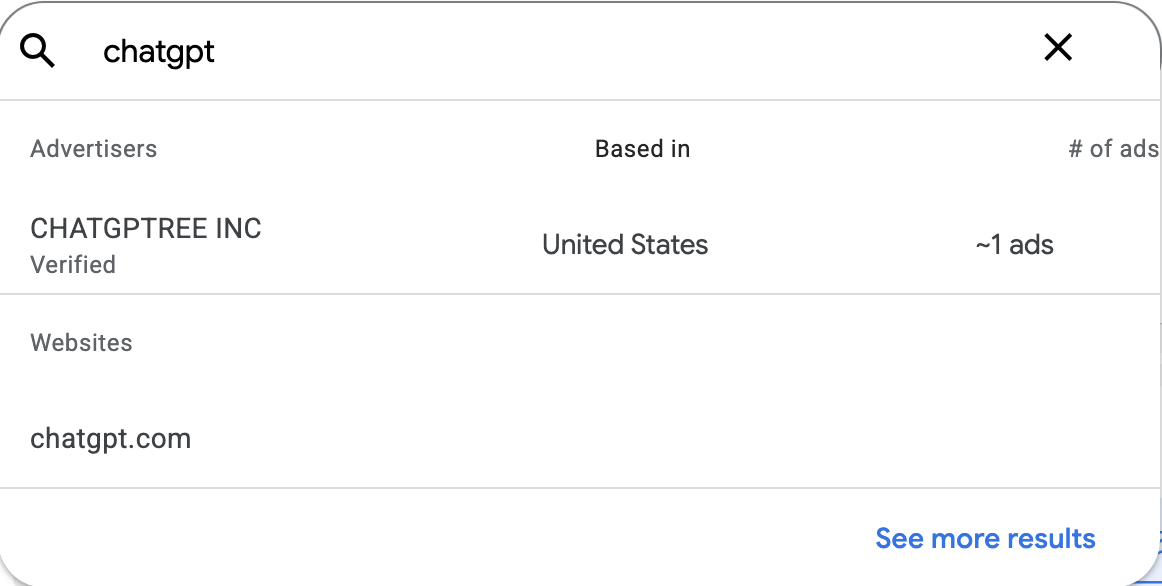
For "chatgpt", the Advertisers list has one entry, and it isn't OpenAI. The website chatgpt.com sits underneath, and that's the one to click.
That opens the domain page, which is every ad that points at chatgpt.com. At the top it warns you that the results come from more than one advertiser account. Every domain page says that, so ignore it.
Under it you get the count, about 40,000 ads, three filter menus, and the first four ads. "See all ads" opens the full grid, 40 at a time. Under each ad is the account that ran it, here "OpenAI OpCo, LLC, Verified".
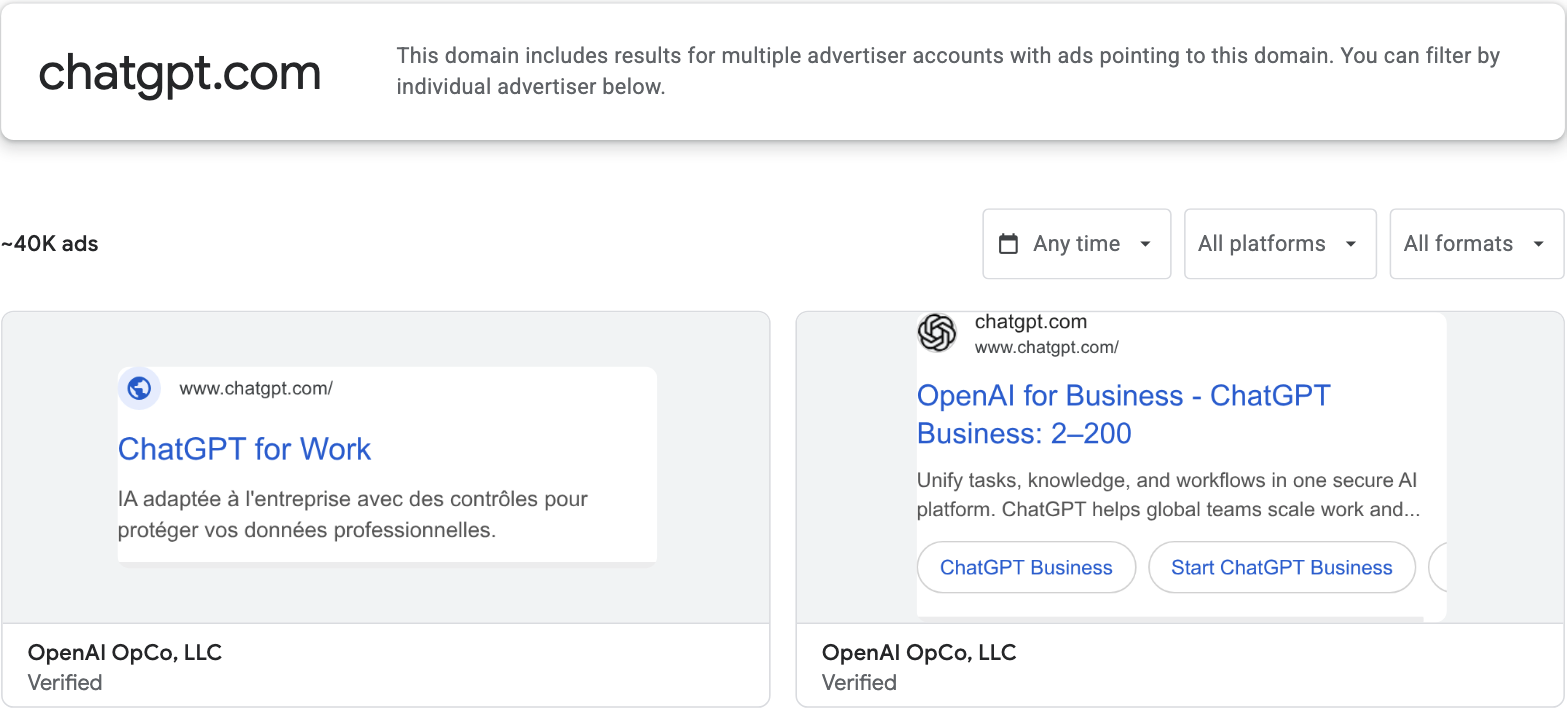
The first two ads are in French and English, both from the same account.
Click that account name and you get the advertiser page. It shows the legal name, the country it's based in, and a badge saying the advertiser has verified its identity. Below that you get this account's own count, the same three menus, and only its own ads.

Three lines and a badge is the whole of an account's panel.
Why the website and not the name? Because the domain page shows every account whose ads point at chatgpt.com, not just OpenAI's. Jotform Inc has ads pointing there, and so does OpenAI's Korean company, under a Korean legal name you'd never type. Search by website and you get all of them at once.
If you search by name instead, you get every advertiser whose name contains what you typed. "openai" returns ten: OpenAI OpCo, LLC first, then OpenAir Fitness B.V. and more OpenAirs. And there's no keyword search at all. The box only matches advertiser names and websites, never the words in an ad.
Read the counts: the three menus and the region
Back on the domain page, the count has three menus beside it: date, platform and format. The date menu runs from Today to Any time. The platform menu splits the count between Search, YouTube, Shopping, Maps and Play, and the format menu between text, image and video.
Each pick changes the count and the ads under it. For chatgpt.com it went like this.
| Filter | Ads |
|---|---|
| Any time, anywhere | about 40,000 |
| Google Search | about 30,000 |
| YouTube | about 20,000 |
| Text | about 30,000 |
| Video | about 10,000 |
| Image | about 2,000 |
Put the region on Germany and the count drops to the ads shown there, about 5,000.
Google rounds every count to one digit. "About 40,000" means anywhere from 35,000 to 44,999, which is also why the platform counts don't add up to the total.
How many ads ChatGPT has live right now
That 40,000 is a year of ads, not what's running today. The Center keeps every ad for a year after it was last shown. To see what's live, set the date menu to Last 7 days.
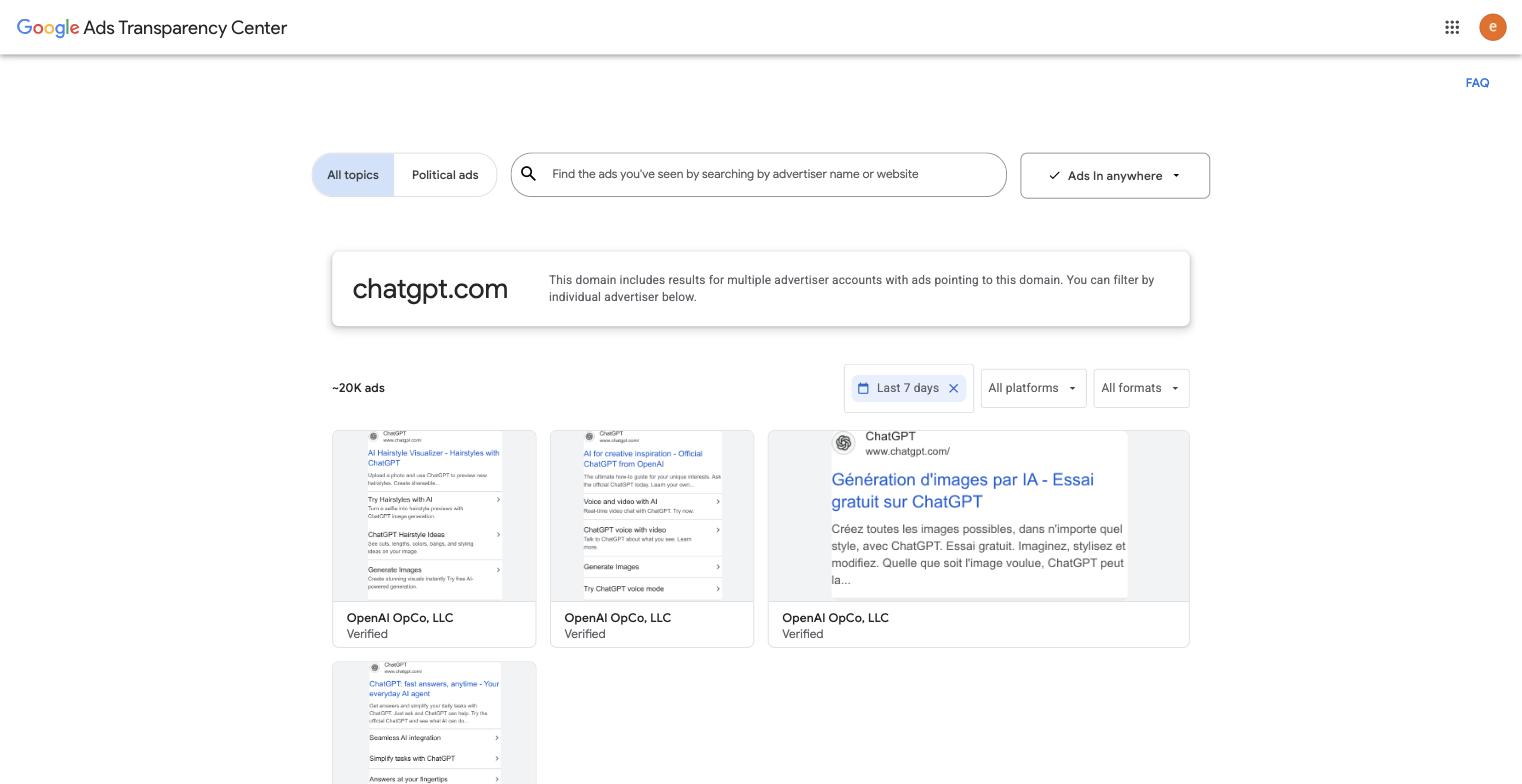
About 20,000 ChatGPT ads ran in the week to September 30, 2026. Half of the year's total was live that week.
Two more things. New ads take 48 to 72 hours to show up, so Today on its own can miss them. And every filter changes the page address, so you can copy the URL and send someone this exact view.
Open an ad
Set the region back to "Anywhere" and click any ad. We opened one of ChatGPT's Portuguese search ads. This is its page.
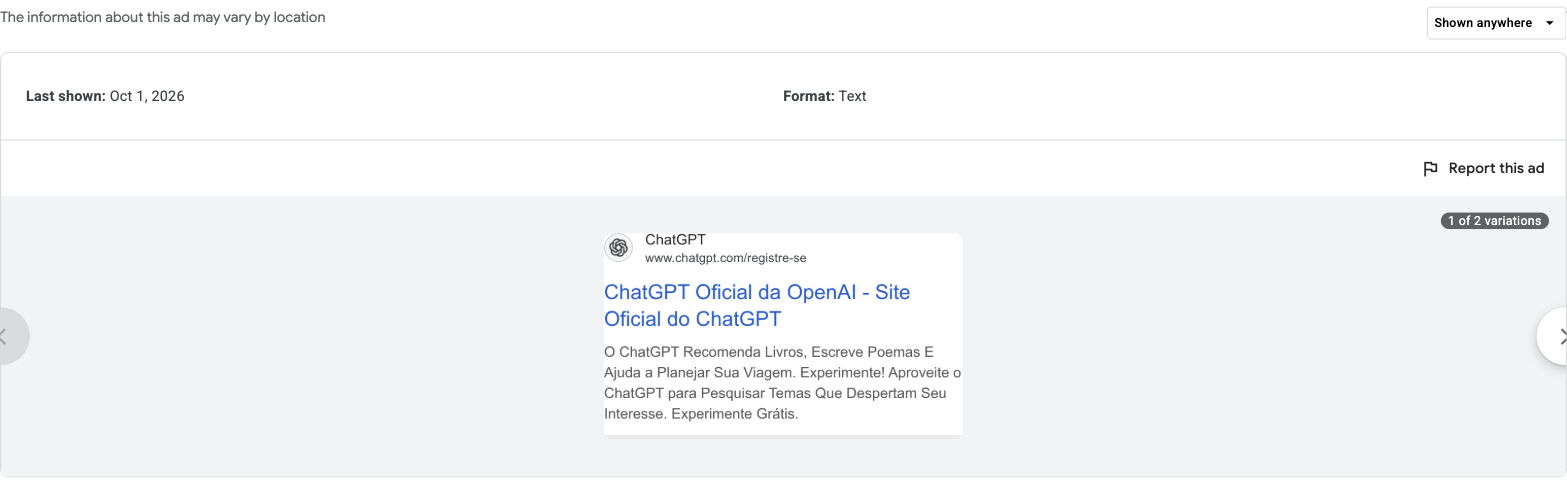
The whole ad page under "Shown anywhere": a two-field panel, then the ad as a picture.
Nothing in the picture is clickable. Google removed the links on purpose and says they won't come back. What you can read is the display URL, the address printed in the ad, here www.chatgpt.com/registre-se. That isn't necessarily the page a click would have opened. The headline and description are in the picture too, so you can read them but not copy them.
Above the picture there's a short panel with a "Shown anywhere" menu, a last-shown date and a format, Text. The date is just the last day the ad ran anywhere, which is why it says October 1, 2026 in the screenshot. Plus a badge saying "1 of 2 variations". That's all. No start date, no numbers.
Where the numbers are: pick an EU country
Under "Shown anywhere" the Center won't tell you when an ad started or how often it ran. It only does that for ads shown in the EU. So on the ad page, open the "Shown anywhere" menu and pick Germany. The panel grows. Now you see the day the ad was first shown in Germany (April 11, 2025) and a topic Google gave it (Internet & Telecom). The last-shown date changes too, to September 28, 2026, the last day it ran in Germany.

Up at the top right, the menu has become a blue chip reading Shown in Germany.
Below that comes "Times shown", a range of how often the ad was shown in the country you picked. People are counted again each time they saw it. For this ad in Germany it's 10K to 15K, counted from that first-shown day to July 1, 2026. Click the small i beside the range and it breaks down by platform, so you can see how much was Search and how much YouTube.

Read the small print under the heading, which is Google's own definition of the range.
Then there's audience selection, which is who the advertiser aimed the ad at, as categories with a plus for included and a minus for excluded. This ad has three rows, Demographic info, Geographic locations and Contextual signals, all plus, and Google stops at the category.
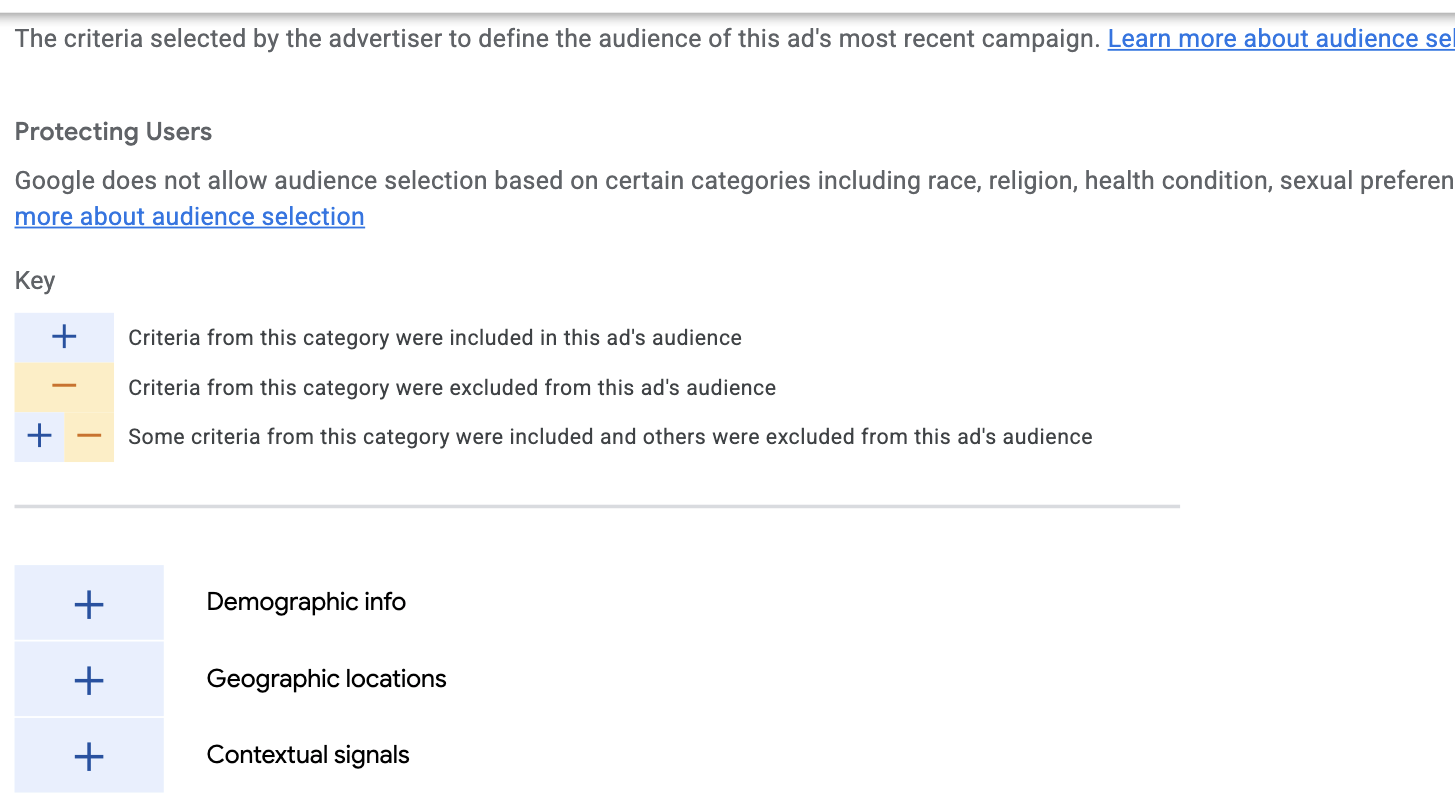
The key has a third state, plus and minus together, for a category that was partly included and partly excluded.
The range and the dates change with the country. France gives 15K to 20K from April 13, 2025 for the same ad, and the Netherlands 15K to 20K from March 27, 2025.
Why does the range stop at July 1 when the ad ran until the end of September? Because Google publishes these ranges 90 days late, and that date is 90 days before the day we looked. A new ad shows nothing yet. The first four ChatGPT video ads we opened under Germany had started in July, August or September 2026. Each said "You'll be able to see this data starting on" a date in late 2026.
From here on, set the region to Germany, or any other EU country, on the domain page before you open anything. The region carries into every ad page, which means every card you click ran there. Pick a country the ad never ran in and the Center just sends you back to "Shown anywhere".
That menu is the ad page's own, separate from the one at the top of the site. It lists 30 countries plus "Europe": the 27 EU members, Norway, the UK and Switzerland. Norway counts too, as part of the European Economic Area, but the UK and Switzerland don't. Pick either of those and you get the short panel again. All of this comes from the EU's Digital Services Act, a 2022 law that makes the biggest platforms keep a public record of the ads they show in the EU.
Spend: political ads only
For these the Center does show spend, and you get to them from the home page. Flip the toggle at the top from "All topics" to "Political ads", with the region on the United States. The page becomes "Political advertising on Google", and every card on it carries the payer, times shown, the dates with a day count, and a spend range. One card, Sam For Montana, was shown 20K to 25K times over 118 days for $10K to $15K.
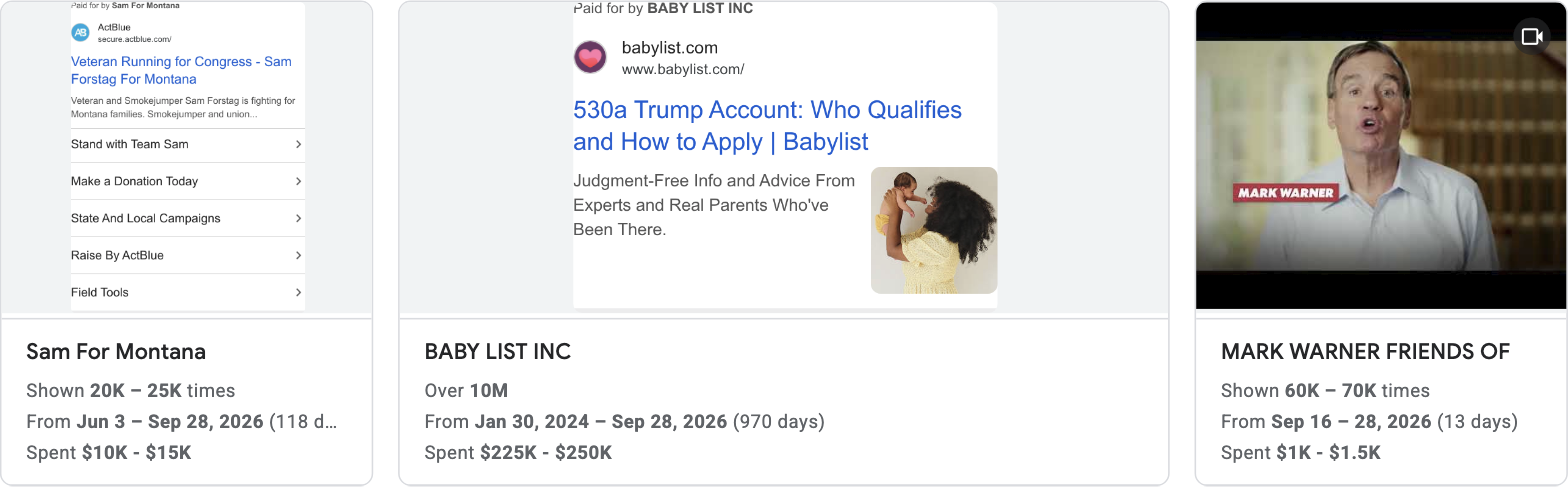
Two search ads and a video, and the one that ran longest is in the middle.
This archive goes further back too. Election ads stay for up to seven years after they were last shown, and the page says it starts on May 31, 2018. It's also the only place in the Center with an "Export data" menu. Google only keeps this archive in the countries where it verifies election advertisers, and the US is one. Flip the toggle back to All topics before you search for anything else, because this page has a search box of its own.
Check a list of domains: the Adyntel API
The Center searches one website at a time, and there's no export. So if you want to check 200 competitors, or a prospect list, that's 200 searches by hand. The Adyntel API does the same lookup by domain, one call per domain, so you can run a whole list from a script.
Here's the call for chatgpt.com:
curl -X POST https://api.adyntel.com/google \
  -H "Content-Type: application/json" \
  -d '{"api_key": "YOUR_KEY", "email": "you@company.com", "company_domain": "chatgpt.com"}'
It comes back in a couple of seconds with the same rounded count as the domain page and the first 40 ads. Each ad comes with the account that ran it, the format, and the first and last day it was seen. You also get the ad as a picture and a link to its page in the Center. The reply also holds a continuation_token. Send it back to get the next 40, or set all_ads to true with a webhook_url and every page gets posted there. Add country_code to keep one country, or media_type to keep only text, image or video ads.
The Center only shows the ad text as a picture. Add "extract-text": true to the call and the API reads the text off each search ad and returns it in a raw_text field. On the page we tried, it read 21 of 22 ads.
The API doesn't return the EU-only numbers (times shown, topic, audience), who paid, spend, or the landing page.
We ran the same call for seven AI assistants.
| Website | All ads | Shown in the US | Shown in Germany | Video ads |
|---|---|---|---|---|
| chatgpt.com (ChatGPT) | about 40,000 | about 4,000 | about 5,000 | about 10,000 |
| perplexity.ai (Perplexity) | about 2,000 | about 1,000 | about 200 | about 300 |
| claude.ai (Claude) | about 900 | about 400 | about 400 | 41 |
| grok.com (Grok) | 80 | 44 | 18 | 11 |
| mistral.ai (Mistral) | 0 | 0 | 0 | 0 |
| deepseek.com (DeepSeek) | 0 | 0 | 0 | 0 |
| copilot.microsoft.com (Copilot) | 0 | 0 | 0 | 0 |
Three of the seven come back with nothing, and that's an answer too: the Center holds no ad pointing at those websites. Gemini is the one you can't look up this way, because its ads point at google.com, and that address holds every Google ad there is. Claude shows 41 video ads, and on the first page 31 were Anthropic's. The other 9 came from eight accounts, a Portuguese tyre shop among them, so keeping only the brand's own is one filter on the reply.
More on the endpoint in the docs and on the Google ads scraper page. We've done the same kind of guide for the LinkedIn Ad Library and the Meta Ad Library.
FAQ
Does it show how much a company spends? Only in the political archive, where every card carries a range. Leave the toggle on All topics and no ad, ChatGPT's included, shows a cost.
Why can't I see impressions on an ad? Because the region is on Anywhere. Pick an EU country, on the domain page or on the ad page, and the times-shown range appears. It needs the ad to have run there and to be more than 90 days old.
Can I search by keyword? Not in the Center, whose box matches advertiser names and websites and nothing else. To search ad text you pull the ads out with the API and read them with OCR.
Does it include YouTube ads? Yes. Pick YouTube in the platform menu on a domain page and the count narrows to ads shown there. A video ad opens as a preview when you click it.
Why can't I find a company? Two usual reasons. The region menu is on your country, so set it to "Anywhere". Or you searched the name and the ads sit under a legal name you don't know, so click the website in the dropdown instead.
Is there an API? Google doesn't offer one for the Center as a whole. It only publishes the EU data, through a link that appears on a domain page once the region is set to an EU country. For everything else, use the Adyntel API: send a domain and get that domain's ads from the Center, 40 per call.
Is there a Google Ads library? People say Google Ads library and mean the Ads Transparency Center, so yes, and you're in it. The Asset Library that also comes up in search results is a different thing, part of your own Google Ads account rather than a public record.